# Farming Simulator 25 - Discord Bot
This bot periodically updates a Discord channel with stats from a Farming Simulator 25 server.
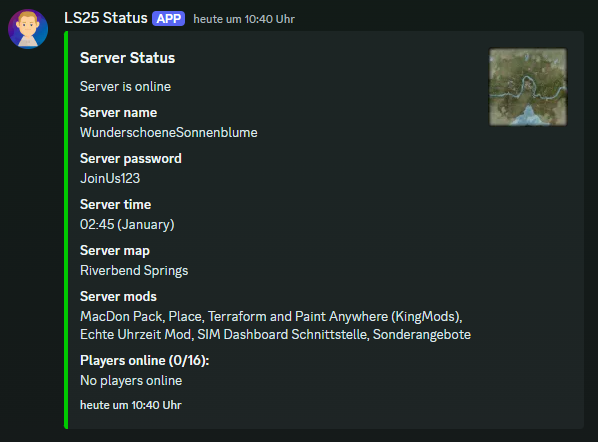
It posts the server name, password, time, and player count. Written in Node.js, it uses the
discord.js library to interact with Discord and fetches server stats via the XML feed
(accessible through the server's web interface). The update interval is configurable.
## Screenshots
Discord embed in english

Discord embed in german
Terminal output (NodeJS)

## Requirements
- **Node.js**: Required if you want to run the bot without Docker.
- **NPM**: Required if you want to run the bot without Docker.
- **Docker (optional)**: Use Docker if you prefer running the bot in a containerized environment.
---
## Installation Guide
### Step 1: Create a Discord Bot
1. Open the [Discord Developer Portal](https://discord.com/developers/applications).
2. Click on `New Application` and give your application a name.
3. Navigate to the `Bot` section in the left menu and click on `Add Bot`.
4. Copy the bot token by clicking `Copy` (you'll need this later).
5. Go to the `OAuth2` > `URL Generator` section in the left menu.
6. Under "Scopes," select `bot`, and under "Bot Permissions," select `Administrator`.
7. Copy the generated URL to invite the bot to your Discord server.
- The URL should look like this:
`https://discord.com/oauth2/authorize?client_id=CLIENT_ID&scope=bot&permissions=8`
---
### Step 2: Configure the Bot
1. Clone the repository to your server
2. Locate the configuration files:
- Use either
- `config.example-de.json` (for German)
- `config.example-en.json` (for English)
- Rename the chosen file to `config.json`.
3. Open `config.json` and fill in the required fields:
- Refer to `SETTINGS.md` for detailed descriptions of each field.
- Fields marked with `(*)` are important to check; other fields can be left empty for default values.
---
## Running the Bot
### Option 1: Run Inside a Docker Container (Recommended)
1. Navigate to the root directory of the cloned repository.
2. Build and start the container:
```bash
docker-compose up -d --build
```
3. The bot should now be running and posting server stats to the specified Discord channel.
### Option 2: Run Without Docker (Using Node.js)
1. Navigate to the root directory of the cloned repository.
2. Install dependencies:
```bash
npm install
```
3. Start the bot:
```bash
npm start
```
4. The bot should now be running and posting server stats to the specified Discord channel.
- Note: Closing the terminal will stop the bot. Use a process manager like [PM2](https://pm2.io/) to keep it running.