mirror of
https://github.com/cloudmaker97/FS25-Discord-Bot.git
synced 2026-01-21 22:48:39 +00:00
A simple discord bot for the LS25 / FS25 / Farming Simulator 25 (with docker support) for server status updates in discord embeds. 🚜
| .github/workflows | ||
| misc | ||
| source | ||
| .gitignore | ||
| config.example-de.json | ||
| config.example-en.json | ||
| docker-compose.yml | ||
| Dockerfile | ||
| LICENSE.md | ||
| package-lock.json | ||
| package.json | ||
| README.md | ||
| tsconfig.json | ||

Farming Simulator 25 - Discord Bot
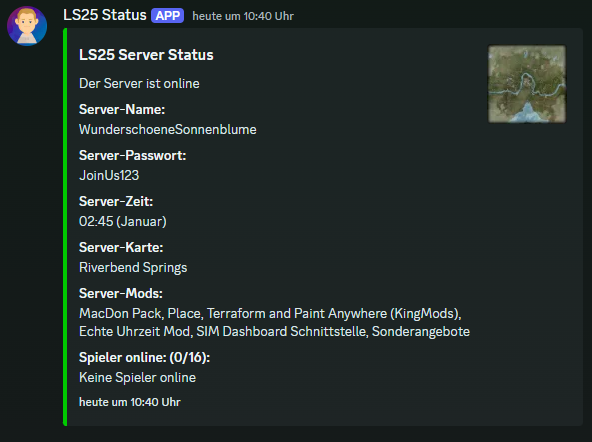
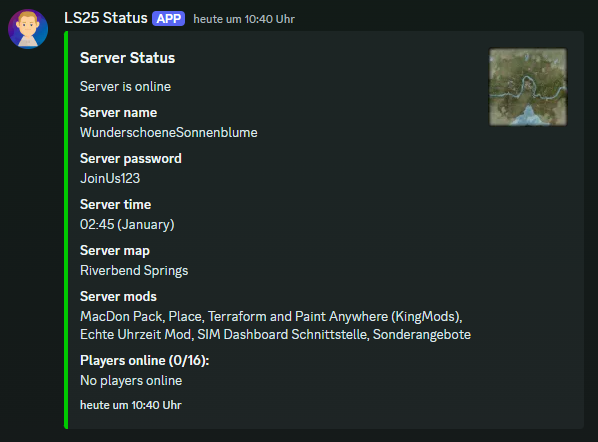
This bot will post the server stats of a Farming Simulator 25 server to a Discord channel. The bot will post the server name, server password, server time, and the player count. The bot will update the server stats every x seconds ( configurable).
Screenshots
Discord embed in english
Discord embed in german
How it works
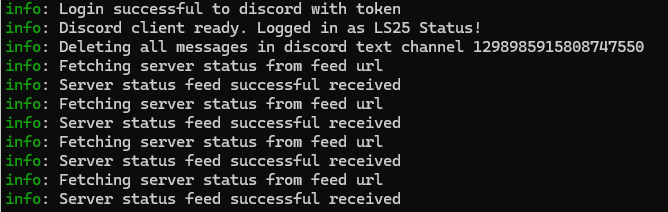
The bot is written in Node.js and uses the discord.js library to interact with the Discord API. It uses the XML-Feed from the Farming Simulator 25 server to get the server stats (you can find the feed URL in the web interface of the server).
Requirements
- Node.js - if you want to run the bot without Docker
- NPM - if you want to run the bot without Docker
- Docker (optional) - if you want to run the bot in a Docker container
Install the bot
Create a Discord bot
- Open the Discord Developer Portal
- Click on
New Application - Name your application
- Click on
Botin the left menu - Click on
Copyto copy the bot token - Click on
Installationin the left menu - Add the Permission 'Administrator' to the bot guild installation (bottom of the page)
- Click on
Copyto copy the URL to install the bot to a guild - Your installation link url should look like this:
https://discord.com/oauth2/authorize?client_id=CLIENT_ID
Configure the bot
- Clone the repository to your server
- Move the
config.example-de.jsonorconfig.example-en.jsontoconfig.json(depending on your language) - Fill in the required fields in the
config.jsonfile, do not delete fields, just leave them empty for default values - All fields with a
(*)are required fields for the bot to work. The other fields are optional and can be left by default
| - Key - | - Description - |
|---|---|
| (*) application.serverPassword | The password to join the server (or leave empty) |
| (*) application.serverStatsUrl | The feed URL to the server stats (from the web interface from the server) |
| (*) application.serverMapUrl | The feed URL to the server map (from the web interface from the server) |
| (*) application.updateIntervalSeconds | The interval in seconds to update the server stats |
| (*) discord.channelId | The channel id where the bot should post the server stats |
| (*) discord.botToken | The bot token from the Discord Developer Portal |
| translation.discordEmbed.title | The title of the Discord embed |
| translation.discordEmbed.descriptionOnline | The description when the server is online |
| translation.discordEmbed.descriptionOffline | The description when the server is offline |
| translation.discordEmbed.descriptionUnknown | The description when the server status is unknown |
| translation.discordEmbed.titleServerName | The title of the server name |
| translation.discordEmbed.titleServerPassword | The title of the server password |
| translation.discordEmbed.titleServerTime | The title of the server time |
| translation.discordEmbed.titlePlayerCount | The title of the player count |
| translation.discordEmbed.noPlayersOnline | The message when no players are online |
| translation.discordEmbed.titleServerMap | The title of the server map |
| translation.discordEmbed.titleServerMods | The title of the server mods |
| translation.common.monthJanuary | The month January in the language of the server |
| translation.common.monthFebruary | The month February in the language of the server |
| translation.common.monthMarch | The month March in the language of the server |
| translation.common.monthApril | The month April in the language of the server |
| translation.common.monthMay | The month May in the language of the server |
| translation.common.monthJune | The month June in the language of the server |
| translation.common.monthJuly | The month July in the language of the server |
| translation.common.monthAugust | The month August in the language of the server |
| translation.common.monthSeptember | The month September in the language of the server |
| translation.common.monthOctober | The month October in the language of the server |
| translation.common.monthNovember | The month November in the language of the server |
| translation.common.monthDecember | The month December in the language of the server |
Run inside a Docker container
- Run
docker-compose up -d --buildin the root directory of the repository - The bot should be running now and posting the server stats to the Discord channel
Run without Docker (Node.js)
- Clone the repository to your server
- Run
npm install - Run
npm start - The bot should be running now and posting the server stats to the Discord channel
- If you close the terminal, the bot will stop running