mirror of
https://github.com/cloudmaker97/FS25-Discord-Bot.git
synced 2025-12-06 00:18:34 +00:00

4.4 KiB
4.4 KiB
Farming Simulator 25 - Discord Bot
This bot will post the server stats of a Farming Simulator 25 server to a Discord channel. The bot will post the server name, server password, server time, and the player count. The bot will update the server stats every x seconds ( configurable).
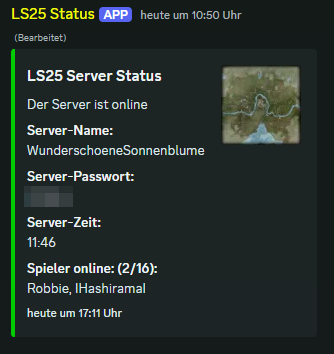
The bot is written in Node.js and uses the discord.js library to interact with the Discord API. It uses the XML-Feed from the Farming Simulator 25 server to get the server stats (you can find the feed URL in the web interface of the server).
Requirements
- Node.js - if you want to run the bot without Docker
- NPM - if you want to run the bot without Docker
- Docker (optional) - if you want to run the bot in a Docker container
Install the bot
Create a Discord bot
- Open the Discord Developer Portal
- Click on
New Application - Name your application
- Click on
Botin the left menu - Click on
Copyto copy the bot token - Click on
Installationin the left menu - Add the Permission 'Administrator' to the bot guild installation (bottom of the page)
- Click on
Copyto copy the URL to install the bot to a guild - Your installation link url should look like this:
https://discord.com/oauth2/authorize?client_id=CLIENT_ID
Configure the bot
- Clone the repository to your server
- Move the
config.example.jsontoconfig.json - Fill in the required fields in the
config.jsonfile, do not delete fields, just leave them empty for default values - All fields with a
(*)are required fields for the bot to work. The other fields are optional and can be left by default
| - Key - | - Description - |
|---|---|
| (*) application.serverPassword | The password to join the server (or leave empty) |
| (*) application.serverStatsUrl | The feed URL to the server stats (from the web interface from the server) |
| (*) application.serverMapUrl | The feed URL to the server map (from the web interface from the server) |
| (*) application.updateIntervalSeconds | The interval in seconds to update the server stats |
| (*) discord.guildId | The guild id where the bot should be installed |
| (*) discord.channelId | The channel id where the bot should post the server stats |
| (*) discord.botToken | The bot token from the Discord Developer Portal |
| translation.discordEmbed.title | The title of the Discord embed |
| translation.discordEmbed.descriptionOnline | The description when the server is online |
| translation.discordEmbed.descriptionOffline | The description when the server is offline |
| translation.discordEmbed.descriptionUnknown | The description when the server status is unknown |
| translation.discordEmbed.titleServerName | The title of the server name |
| translation.discordEmbed.titleServerPassword | The title of the server password |
| translation.discordEmbed.titleServerTime | The title of the server time |
| translation.discordEmbed.titlePlayerCount | The title of the player count |
| translation.discordEmbed.noPlayersOnline | The message when no players are online |
Run inside a Docker container
- Run
docker-compose up -d --buildin the root directory of the repository - The bot should be running now and posting the server stats to the Discord channel
Run without Docker (Node.js)
- Clone the repository to your server
- Run
npm install - Run
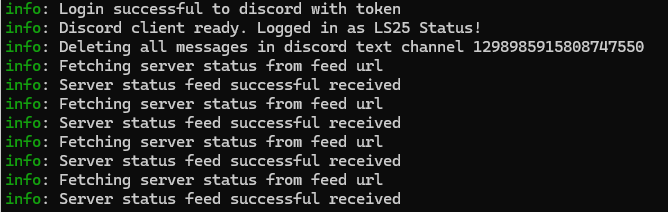
npm start - The bot should be running now and posting the server stats to the Discord channel
- If you close the terminal, the bot will stop running